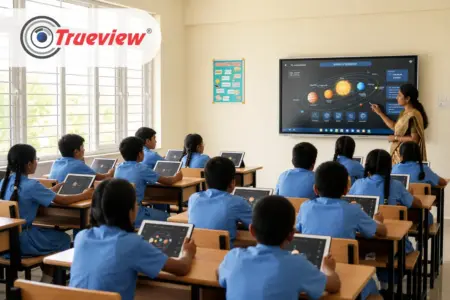
Technology has transformed education, but many classrooms are still struggling with the unnecessary combination of devices. Teachers setting up a classroom tend to juggle the projector, CPU, speakers, whiteboard, wires, and more, which always results in time lost.
Schools have been moving away from this setup toward an all in one computer for education. It is a simple, more practical way to enhance education for students. The perfect blend of computing power, display capabilities, and smart classroom features into one allows schools to become organised, efficient, and future-ready.
Trueview All in One Computer is designed to reduce classroom technology complexity while supporting interactive learning, hybrid learning, AI-powered education, and classroom collaboration.
In this blog, we will discuss how the Trueview All in One Computer for education has simplified the classroom and made the educational environment more interactive. Keep reading!
Why Traditional Classroom Technology Creates Unnecessary Complexity
Many educational institutions are consistently adding new technology to their classrooms. Thus, the classroom contains multiple independent devices that must work in harmony for better results.
A typical classroom may include:
- Desktop computer
- Monitor
- Projector
- External speakers
- Webcam
- Whiteboard
- HDMI switchers
- Multiple cables
- External storage devices
Managing every device is complex and has a higher chance of setup failure due to loose connections, compatibility issues, damaged cables, outdated hardware, and more. Hence, it leads to delays in classes and frustration among the teachers.
What Makes an All in One Computer Stand Apart
1] One Screen, Not Multiple Devices
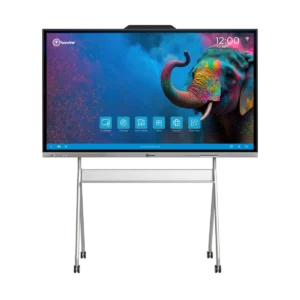
An All in One Computer for Education combines a display, processors, speakers, and touch functionality into a single unit. There is no need for an external CPU tower, a separate speaker, or a tangle of HDMI or power cables running across the room.
For a school, they just have to install one thing, maintain one device, and troubleshoot one thing if anything goes wrong.
2] The ADPM Difference
Trueview All in One computer runs on ADPM, which stands for Advanced Digital Processing Module. ADPM is the built-in processor that powers the entire system without requiring an external CPU. It tends to handle everyday classroom tasks, such as using educational apps, switching between lessons, managing video calls, and more, without lag.
3] Dual Operating System for Classroom Flexibility
Teachers can get an Android OS for quick access to browsing and educational apps, along with a Windows PC module for tasks that need MS Office, Zoom, or other desktop software.
4] Reducing Classroom Clutter
An All in One Computer for Education eliminates the need for multiple classroom devices. The wall-mounted and stand-mounted designs minimise the risk of accidental damage and make the classroom more organised.
5] Touch-Based Interaction
With touch-based integration, teachers can write, draw, and annotate directly on the screen using a keyboard and mouse. Hence, it makes the teaching experience more interactive, conversational, and engaging for the students.
6] Supporting Hybrid and Remote Learning
Hybrid learning is quite popular; it allows students to join from home or for a teacher to cover a class from a different location. Trueview All in One Computer supports built-in video conferencing, screen sharing, and recording.
You can buy or explore All in One Computer for Education range here.
AI-Powered Teaching with Trueboard.ai
Modern classrooms increasingly require intelligent educational tools rather than only presentation software.
Trueview Trueboard.ai adds AI-powered teaching support that helps educators prepare and deliver lessons more efficiently.
Depending on classroom needs, teachers can use features such as:
- AI Chat
- OCR
- AI Lesson Planning
- AI Worksheet Generation
- AI Quiz Creation
- AI Rubric Creation
- AI Content Creation
- Interactive Simulations
- E-books
- Math Tools
Unlike searching across multiple websites and applications, teachers can access educational resources from one intelligent platform, making lesson preparation faster and more engaging.
What to Check Before Choosing an All in One Computer
When a school owner is choosing an All in One Computer for classrooms, a few practical features can help to choose the right one:
- Screen Size and Room Size: Larger classrooms may need larger screens to ensure visibility for students seated farther back.
- Operating System Needs: Consider whether there is a requirement for Android applications, Windows software such as MS Office, or both, as Trueview ADPM supports dual operating systems.
- Installation Type: Choose between wall-mounted and stand-based setups depending upon the classroom setup and available space.
- Connectivity Requirements: Check whether the unit supports connections compatible with those used by the school, including WiFi, USB, and HDMI.
- Admin Control Needs: For multiple classrooms, inquire about the device management facilities provided by the vendor.
- Support and Service: Look for a vendor with reliable after-sales support, since classroom technology needs quick fixes during school hours.
How an All in One Computer for Education Simplifies the Classroom
An All in One Computer for Education combines essential classroom technology into a single integrated system.
Instead of connecting multiple external devices, teachers receive a single platform ready for daily classroom use.
The advantages include:
- Cleaner Classroom Setup: With fewer devices and cables, classrooms look more organised and easier to manage.
- Faster Lesson Preparation: Teachers, without wasting time on checking hardware connections or troubleshooting equipment, can start the lecture quickly.
- Improved Reliability: With fewer components, the All in One Computer reduces the likelihood of technical failures during teaching sessions.
- Easier IT Management: School IT teams have fewer devices to install, update, monitor, and maintain, reducing long-term operational effort.
Ideal for Future-Ready Educational Institutions
- Meeting Modern Standards: With the evolution of education, AI, digital content, hybrid learning, and interactive teaching have become new standard expectations.
- The Risk of Outdated Tech: Institutions that continue to rely on legacy classroom startups may struggle to meet future learning requirements.
- A Scalable Foundation: A modern All in One Computer provides a unified scalable ecosystem that seamlessly supports digital classrooms, collaboration, and hybrid education.
- Future-Proof Investment: Instead of continuously patching together separate pieces of hardware, schools can build the entire classroom strategy around a single, unified technology.
Takeaway
Classroom technologies do not have to be a pile of separate devices that each need their own setup and cables, and a point of failure. An All in One Computer for Education combines the display, processor, and speaker in a single system, eliminating the need for extra hardware.
Trueview ADPM range takes it further by providing a dual-operating-system capability that lets teachers move beyond Android apps and Windows software without switching devices. A touchscreen and hybrid learning, built-in video conferencing, and skill sharing make learning more interactive and engaging.
The interface is simple enough that teachers without a technical background can use it right away, while admin tools give schools a way to manage across different classrooms. Schools and coaching centers looking to simplify their classrooms should choose Trueview All in One Computers for future-ready classrooms.
About Trueview
 Trueview is the trusted Indian technology brand that has spent several years developing surveillance systems, displays, educational technology solutions, and more. Our product range includes CCTV cameras, digital signage, video walls, all-in-one computers, and more, all developed with a focus on reliability.
Our All in One Computers serve classrooms, offices, and public spaces where clear and reliable visuals are necessary. The combination of surveillance and display expertise enables us to support a wide variety of use cases without compromising on quality.
Beyond education, we provide scalable solutions for enterprises, retail businesses, healthcare facilities, hospitals, manufacturing units, government organisations, and much more. We aim to help customers adopt technology that improves efficiency while remaining ready for future growth.
If you have any questions about choosing the right All in One Computer for education, feel free to contact us. We would be happy to assist you!